

Sue Pats
How Stay-At-Home Parents Are Building $1,000\/Month Digital Product Businesses
Introduction: You Can Make Money Without Leaving Home (Or Your Kids)
You're a stay-at-home parent.
You chose this life for a reason.
Maybe you wanted to be present for your kids. Maybe childcare was too expensive. Maybe you wanted flexibility.
But there's something missing.
Financial independence.
Relying on one income is stressful. What if something happens? What if you want to buy something without asking? What if you want to feel like you're contributing financially?
You want to make money.
But the constraints are real:
Limited time (kids interrupt constantly)
Limited space (working from home with kids around)
Limited energy (parenting is exhausting)
Limited availability (can't take client calls during school hours)
So you think: "I can't build a business while taking care of kids."
This is false.
Thousands of stay-at-home parents are building profitable digital product businesses.
They're earning:
500–1,000/month (part-time)
2,000–5,000/month (serious effort)
$10,000+/month (scaled operations)
All while being present for their kids.
All while working 5–15 hours per week.
Why Digital Products Are Perfect For Stay-At-Home Parents
Digital products (templates, guides, courses, checklists) are ideal because:
✅ No time restrictions — Create when kids nap, after bedtime, during quiet time
✅ No customer interaction — Sales page sells it, email delivers it, no calls
✅ Passive income — Created once, sold repeatedly
✅ Home-based — No commute, no office, no childcare needed
✅ Flexible — Work 5 hours one week, 15 hours the next
✅ Scalable — 1 customer or 1,000 customers = same effort
✅ No experience required — Use templates, follow systems, leverage expertise
This is the perfect business model for stay-at-home parents.
What You'll Learn
By the end, you'll know:
✅ Why digital products work for parents (the advantages)
✅ What to sell (ideas suited for parents)
✅ The complete system (step-by-step)
✅ Timeline to $1,000/month (realistic expectations)
✅ Real examples (parents doing this right now)
✅ How to start (this week, with kids at home)
Let's build your parenting-compatible digital product business.
Part 1: Why Digital Products Are Perfect For Stay-At-Home Parents
The Problem With Traditional Income (For Parents)
Option 1: Get a job
Requires childcare (1,000–\2,000/month)
Requires 40 hours/week minimum
No flexibility (can't leave early if kid is sick)
Stressful (guilt about not being with kids)
Net income: Maybe 500–1,000 after childcare costs
Option 2: Freelancing (virtual assistant, writing, design)
Requires client interaction (calls, meetings, feedback)
Requires specific hours (clients want real-time support)
High stress (multiple clients, deadlines, revisions)
Vulnerable (lose client = lose income)
Income: 1,000–3,000/month but exhausting
Option 3: Digital products
No childcare needed
Flexible hours (5–15 hours/week)
No client interaction (after product is made)
No interruptions (kids can't interrupt automated sales)
Passive income (sells while you sleep)
Income: 500–10,000+/month
Digital products are the only option that actually fits being a parent.
The Three Reasons Digital Products Work For Parents
Reason 1: No Time Constraints
Traditional job: "You must work 9–5."
Freelancing: "You must be available when clients need you."
Digital products: "Create whenever you want."
Real life example:
You have a client call at 2 PM. Your kid needs to be picked up from school at 2:30.
If you're freelancing: Problem.
If you're selling digital products: No problem. The sale happens automatically.
Your schedule is yours.
Reason 2: Kids Are Actually An Advantage
This sounds crazy. But stay with me.
Kids are an advantage because:
✅ You understand the problems parents face (you live it)
✅ You know what solutions parents want (because you want them)
✅ You can create products parents will buy (because you're the customer)
Example: You could sell:
"Content calendar templates" (for busy parents who blog)
"Time management guides" (for parents juggling everything)
"Email templates for moms" (relatable, specific)
"Home-based business guides" (you're doing it)
You're not competing with non-parents. You're serving parents who understand your constraints.
Your parenting experience is your advantage.
Reason 3: You Can Use Nap Time, Quiet Time, Bedtime
Your schedule:
9 AM–12 PM: Parenting (play, meals, activities)
12 PM–1 PM: Nap time — Create digital product (1 hour)
1 PM–3 PM: Parenting (afternoon activities, snack)
3 PM–5 PM: Quiet time — Create digital product (2 hours)
5 PM–7:30 PM: Dinner, bath, bedtime
7:30 PM–9 PM: Kids asleep — Create digital product (1.5 hours)
Total daily: 4.5 hours
Total weekly: 31.5 hours
But realistically, you'd do 1–2 hours per day:
1 hour/day × 5 days = 5 hours/week
In 5 hours per week, you can:
Batch create social media posts
Write emails
Market your product
Engage with audience
No time constraints. Just flexibility.
The Advantage vs. Non-Parents
Non-parent starting digital product business:
Has all the time they want
But doesn't understand parent pain points
Creates products nobody wants
Wastes time on wrong things
Parent starting digital product business:
Has less time
But deeply understands parent pain points
Creates products parents will pay for
Efficient with time (because they have to be)
Who wins?
The parent. Because they know the market intimately.
The Financial Reality
Traditional income for stay-at-home parents:
Before: $0/month
With part-time job: 500–1,000/month (after childcare)
With freelancing: 1,000–3,000/month (exhausting)
Digital product business:
Month 1-3: 0–500 (building)
Month 4-6: 500–2,000 (scaling)
Month 7-9: 2,000–5,000 (momentum)
Month 10-12: 3,000–10,000+ (established)
By year-end, you're making 3,000–10,000+/month.
All while being present for your kids.
The Lifestyle Benefits
Beyond money, digital products offer:
✅ You're present for your kids (no guilt about being away)
✅ You're building something (contributes to identity, not just "parent")
✅ You have financial input (independence, self-worth)
✅ You're modeling entrepreneurship (kids see you build)
✅ You have flexibility (everything bends to fit family)
✅ You control your income (not dependent on employer)
✅ You're building assets (the business is yours)
This is why parents choose digital products.
Part 2: What To Sell (Product Ideas For Stay-At-Home Parents)
Idea 1: Parent-Focused Templates & Guides
Who buys: Other parents
What they buy:
Content calendar templates (for parent bloggers)
Email templates (for mom businesses)
Social media templates (for parent influencers)
Time management guides (for busy parents)
Meal planning templates (for meal prep)
Budget templates (for family finances)
Homeschool curriculum guides
Routine-building checklists
Why it works:
You understand the pain points
You know what would help
Parents trust other parents
Priced: 27–97 per product
Potential income: 500–3,000/month
Example: You create a "Content Calendar for Mom Bloggers" template. You sell it for $47. 30 moms buy it = $1,410 revenue in one month.
Idea 2: Online Business Guides For Parents
Who buys: Other stay-at-home parents wanting to build income
What they buy:
"How to start a digital product business" guides
"Digital product idea checklist"
"Pricing strategy guide for digital products"
"Email marketing for parent entrepreneurs"
"Side hustle for stay-at-home parents" course
"Passive income for busy parents" guide
Why it works:
Huge market (millions of stay-at-home parents)
You have lived experience
Other parents respect your journey
High perceived value
Priced: 47–197 per product
Potential income: 2,000–8,000/month
Example: You create a guide "The Stay-At-Home Parent's Guide to Digital Products." You sell it for $67. 50 parents buy it = $3,350 in first month. Repeat monthly.
Idea 3: Parenting-Specific Services (Asynchronous)
Who buys: Parents needing help
What they buy:
Custom content calendar creation (for parent bloggers)
Email sequence writing (for mom businesses)
Social media content planning (for parent influencers)
Business strategy consulting (asynchronous, email-based)
Why it works:
Higher price point (500–\2,000 per project)
You understand parent constraints
Can work on your schedule (asynchronous)
Limited client load (2–3 clients = 3,000–6,000/month)
Potential income: 2,000–6,000/month
Example: You offer "Email Sequence Writing for Mom Entrepreneurs" at $1,500 per package. 2 clients per month = $3,000/month.
Idea 4: Printables & Digital Downloads
Who buys: Parents, teachers, homeschoolers
What they buy:
Printable checklists (routines, habits, goals)
Meal planning printables
Budget tracking printables
Homeschool planners
Kids' activity pages
Schedule templates
Goal-setting workbooks
Why it works:
Low creation time (many can be created in hours)
Low price point (7–\27) means high volume
Passive income (sell forever)
Easy to create (use Canva templates)
Potential income: 500–3,000/month
Example: You create 10 printable products. Average price $17. Average 10 sales each per month = 100 sales = $1,700/month.
Idea 5: Parent Courses (Semi-Passive)
Who buys: Parents wanting to learn
What they buy:
"How to build a digital product business" course
"Email marketing for mom entrepreneurs" course
"Content creation for parent influencers" course
"Time management for parents" course
"Side hustle for busy parents" course
Why it works:
Higher price point (97–\397)
Perceived as more valuable than guides
Can be mostly pre-recorded (no live calls)
Sells for months/years
Potential income: 1,000–10,000+/month
Example: You create a "Digital Product Business Course" for parents. Price: $197. 15 sales in month 1 = $2,955. 10 sales in month 2 = $1,970. Ongoing.
Idea 6: Email List Monetization (Multiple Streams)
How it works:
Build email list of parents
Send valuable weekly emails
Include recommendations (affiliate + own products)
Multiple income streams from same list
Income streams:
Affiliate commissions (200–500/month)
Digital products (500–2,000/month)
Services (500–3,000/month)
Sponsors/ads (200–\1,000/month)
Total: 1,400–6,500+/month from one email list
Example: You have 3,000 parent subscribers. You email weekly with valuable content + recommendations. 2% buy your $67 product = 60 sales = $4,020/month. Plus affiliate = $4,500+/month.
Best Starting Product For Parents
Start with: A guide or template bundle (27–\67)
Why:
Faster to create (10–20 hours)
Easier to market (other parents relate)
Quicker to profitability (weeks, not months)
Less pressure (lower price, easier to sell)
Builds confidence
Creates social proof
Positions you for higher-priced products later
Part 3: The Timeline (From Idea To $1,000/Month)
Week 1: Choose & Plan (5 Hours)
Monday:
Review product ideas above
Choose one that excites you
Think about your audience
Tuesday-Wednesday:
Research: What do other creators sell?
Check pricing
Note what sells well
Identify gaps
Thursday:
Define your product
Who is it for?
What problem does it solve?
How much should it cost?
Friday-Sunday:
Document your plan (1 page)
Research tools you'll need
Create simple outline of product
Week 1 output: Clear product idea, target audience, pricing
Weeks 2-3: Create Product (15–20 Hours)
Week 2:
Monday-Tuesday: Outline your product
Main topics
Sections
Content breakdown
Wednesday-Friday: Create content
Write sections
Add examples
Organize logically
Saturday-Sunday: Polish
Edit
Add visuals (if applicable)
Format nicely
Week 3:
Monday-Wednesday: Finalize product
Final edits
Add bonus materials
Package it (PDF, template, etc.)
Thursday: Set up delivery
Create sales page
Set up payment processing (Gumroad)
Test purchase process
Friday-Sunday: Prepare to launch
Create social media graphics
Draft email announcement
Plan marketing
Weeks 2-3 output: Finished product, sales page live, ready to sell
Week 4: Soft Launch (8 Hours)
Monday:
Email announcement to any existing contacts
Post about it on social media
Share in relevant communities (groups, forums)
Tuesday-Wednesday:
Create educational content about the problem your product solves
Post on social media
Share via email
Engage with people who interact
Thursday:
Reach out to potential customers (DMs, comments)
Offer product if they express interest
Ask for feedback/testimonials
Friday-Sunday:
Gather early sales/testimonials
Share social proof
Create urgency (limited launch pricing, etc.)
Week 4 output: First 5–15 sales, early testimonials, social proof
Month 2: Scale (10–12 Hours/Week)
Week 1-2:
Increase marketing effort
Create more educational content
Build email list
Engage daily with audience
Send weekly promotional emails
Week 3-4:
Analyze what's working
Double down on effective content
Test different price points or offers
Add upsells (additional products)
Expected sales: 20–35 sales
Expected revenue: 1,340–2,345 (at $67/product)
Minus initial costs: ~1,300–\2,300 profit
Month 2 output: Profitability reached, clear picture of what works
Month 3: Optimize (10–12 Hours/Week)
Week 1:
Improve sales page based on feedback
Optimize email marketing
A/B test different messaging
Week 2:
Leverage social proof (testimonials, results)
Create case studies
Build urgency
Week 3:
Plan second product
Start research/creation on product #2
Prepare for scaled marketing
Week 4:
Analyze month 2 data
Double down on best channels
Plan month 4
Expected sales: 30–50 sales
Expected revenue: 2,010–3,350
Month 3 output: $2,000+/month achieved, system documented
The 3-Month Timeline Summary
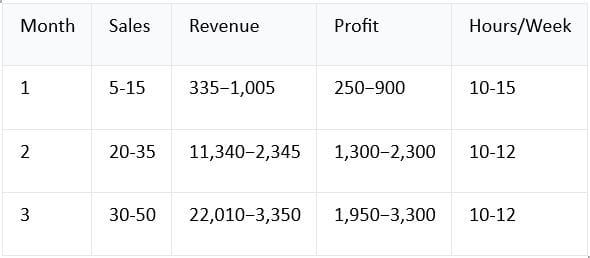
By month 3, you're making $1,000+/month.
Working 10–12 hours per week.
While being fully present for your kids.
Part 4: The System (Tools & Templates You Need)
Essential Tools (Free Or Low Cost)
Email Marketing Platform
ConvertKit, Flodesk, or Beehiiv
Free tier available
Essential for: Building list, sending emails, automating sales
Cost: Free–$99/month
Payment Processing
Gumroad (easiest for digital products)
Or Stripe + email platform
Essential for: Processing sales, delivering product
Cost: Free (Gumroad takes 10%)
Content Creation
Canva (graphics, templates, designs)
Google Docs (writing)
Notion (planning, organization)
Cost: Free tier sufficient
Landing Page Builder
Carrd ($19/year) or Leadpages
Essential for: Sales page, conversions
Cost: Free–$99/month
Social Media Scheduling
Buffer or Later
Optional but helpful for batch posting
Cost: Free–$25/month
Content/Template Library (Optional but Recommended)
Faceless Marketing Kit ($67)
Pre-made templates, content calendars, email sequences
Speeds up your marketing
Cost: $67 one-time
Total Startup Cost
Minimal setup: Free–$50
With premium tools: 50–150/month (optional)
With Faceless Marketing Kit: $67 + free/low-cost tools
The Template Strategy (For Faster Creation)
Instead of creating from scratch:
Use templates. They save hours.
What templates help:
✅ Canva templates (for graphics, social media posts)
✅ Email templates (for promotional emails)
✅ Sales page templates (for landing pages)
✅ Content calendars (for planning posts)
Where to find:
Canva (built-in)
Faceless Marketing Kit (100+ included)
Gumroad (search for templates)
The Complete Toolkit
For under $100, you have:
✅ Email platform (free)
✅ Payment processing (free/commission)
✅ Content creation tools (free)
✅ Landing page builder (free/paid)
✅ Templates to speed up work ($67 optional)
This is the cheapest, fastest way to start.
Part 5: Real Stay-At-Home Parents Making $1,000+/Month
Example 1: Jessica (Mom of Two)
Starting point: Stay-at-home mom, wanted income, no business experience
Product: Content calendar templates for parent bloggers ($47)
Process:
Month 1: Created templates using Canva
Month 2: Launched to small audience, got first 10 sales
Month 3: Scaled marketing, got 30 sales
Month 4-6: Grew to 50 sales/month
Results after 6 months:
Revenue: $2,350/month
Audience: 2,000 email subscribers
Time invested: 8–10 hours/week
Kids still her priority
How she did it:
Created product during nap time and after bedtime
Marketed via Instagram (2 posts/day, 10 min total)
Sent weekly email (20 min)
Zero client calls, zero interruptions
Key insight: "Other moms get it. They buy from me because they understand my life."
Example 2: Marcus (Dad of Three)
Starting point: Stay-at-home dad, partner worked full-time, wanted to contribute income
Product: "How to Build a Digital Product Business" guide for parents ($67)
Process:
Month 1: Wrote guide, 15 hours total
Month 2: Launched, got 8 sales
Month 3: Scaled to 25 sales
Month 4: Added email sequences, 35 sales
Month 5-6: Added second product (email templates), 50 combined sales
Results after 6 months:
Revenue: $3,750/month (from both products)
Audience: 3,500 email subscribers
Time invested: 10–12 hours/week
Fully present for kids
How he did it:
Batch created content on Sunday (3 hours)
Answered emails 2x per day (15 min each)
Posted daily via scheduling (5 min)
Weekly email sent automatically
Key insight: "Parents respect other parents. They want to buy from people who understand."
Example 3: Sarah (Mom of One, Part-Time Job)
Starting point: Stay-at-home/part-time work, wanted supplemental income
Product: Printables bundle (10 items: routines, goals, budgets, etc.) ($17)
Process:
Months 1-2: Created printables using Canva
Month 3: Launched, started with 30 sales/month
Month 4: Added more printables, 60 sales
Month 5-6: Optimized, 80 sales/month
Results after 6 months:
Revenue: $1,360/month (from printables)
Plus: Started email sequences (another $200/month)
Audience: 1,500 email subscribers
Time invested: 5–8 hours/week
Still able to do part-time work
How she did it:
Batch created 10 printables in first 2 weeks
Scaled through Pinterest and Instagram
Minimal ongoing creation (just marketing)
Truly passive after month 2
Key insight: "Printables were the easiest product. Low time investment, high volume sales."
Part 6: Getting Started This Week
Your Action Plan
Day 1: Decide
Monday (1 hour):
Review product ideas from Part 2.
Ask yourself:
Which excites me most?
Which solves a problem I have?
Which could other parents want?
Which is fastest to create?
Decision: Choose one product to create.
Write down:
Product name
Who will buy it
What problem it solves
Rough price point
Day 2-3: Research & Plan
Tuesday-Wednesday (2 hours):
Research:
Search your product on Gumroad
See what competitors sell
Note pricing, features, reviews
Identify what's missing
Plan:
Outline your product
List main sections/topics
Note what makes yours different
Create simple structure
Document your plan (1 page is enough)
Day 4-7: Create
Thursday-Sunday (8–12 hours):
Create your product.
If it's a guide:
Outline sections
Write content
Add examples
Format nicely
Create PDF
If it's templates:
Sketch designs
Use Canva to create
Test usability
Create bundle
Add instructions
If it's printables:
Design each item in Canva
Create PDF of each
Bundle together
By Sunday: Finished, tested product ready to sell
Week 2: Set Up Systems
Monday-Friday (5 hours):
Set up:
Email platform (choose ConvertKit, Flodesk, or Beehiiv)
Payment processing (Gumroad)
Landing page (use Carrd)
Social media presence (Instagram, LinkedIn, or both)
Create:
Sales page (describe product benefits, pricing, CTA)
Welcome email (for new subscribers)
Promotional content (3–5 graphics or posts)
Test:
Try purchasing your own product
Make sure email delivery works
Check that everything functions
Week 3: Launch & Market
Monday-Friday (5–8 hours):
Announce:
Email announcement (to any contacts/list)
Social media posts (multiple)
Communities/groups (find relevant ones, share)
DMs (reach out to potential customers)
Content:
Post valuable content (3x per week)
Share about the problem your product solves
Engage with audience
Send weekly email
Sales:
First sales should come this week
Gather testimonials from buyers
Share social proof
Expected: 5–15 sales in week 3
The Next 30 Days
Week 1: Plan and research (1 hour)
Week 2: Create product (8–12 hours)
Week 3: Set up systems (5 hours)
Week 4: Launch and market (8–10 hours)
Total: 22–38 hours
Spread over 4 weeks: 5–10 hours per week
Your kids will barely notice.
By week 4, you're making sales.
By month 2, you're making 500–1,000+.
Part 7: Your Starter Kit (What You Need To Know)
Tools to Have
✅ Email platform (free)
✅ Payment processor (Gumroad = free)
✅ Landing page builder (free or $19/year)
✅ Content creation (Canva free tier)
✅ Templates to speed up work (Faceless Marketing Kit = $67, optional)
Templates You Should Use
Why templates matter:
They save hours. Hours you don't have.
What to use templates for:
✅ Social media graphics (Canva templates)
✅ Sales page (landing page template)
✅ Email sequences (email template)
✅ Content calendar (plan your posts)
The Faceless Marketing Kit includes:
100+ Canva templates (Instagram, stories, carousels)
Content calendars (pre-planned)
Email sequences (pre-written)
Social media scripts (pre-written captions)
Bonus templates (sales pages, lead magnets)
Cost: $67
Value: Saves 20–30 hours of template creation
ROI: Pays for itself in first week of sales
Timeline to $1,000/Month
Month 1: 300–800 (building, first sales)
Month 2: 800–1,500 (scaling, second product ideas)
Month 3: 1,200–2,000+ (momentum, established)
This is realistic. This is achievable.
Conclusion: You Can Do This
Here's what you now know:
✅ Digital products are perfect for stay-at-home parents
✅ You have real advantages (understand your market)
✅ Multiple product ideas exist (choose what fits)
✅ The timeline is realistic (3 months to $1,000/month)
✅ Real parents are doing this (not theoretical)
✅ You can start this week (action plan included)
✅ It's affordable (under $100 to start)
You don't have to choose between being present for your kids and having income.
You can have both.
Start this week.
$67 for everything you need to launch your digital product business.
Start this week. Make your first $1,000 by month 3.
Your kids come first. Your income comes second.
But you can have both.
Get started today.
Copyright © 2022 SuePats.com - nubeginning.com | All Rights Reserved | PRIVACY POLICY - TERMS & CONDITIONS - DISCLAIMER