

Sue Pats
What You Get For $67 With The Faceless Marketing Kit (Full Breakdown)
Introduction: Transparency First
You're considering the Faceless Marketing Kit.
$67 seems cheap. But you want to know exactly what you're getting before you buy.
That's smart.
I'm going to show you everything. Not hype. Just facts.
Here's what I'll break down:
✅ All 8 products inside (what each one actually is)
✅ Individual value of each (what it would cost separately)
✅ How to use each one (practical application)
✅ Real examples (what you'll create with it)
✅ Total value (the math)
✅ Who benefits most (is it for you?)
No fluff. Just transparency.
Let's dive in.
Product 1: 100+ Professional Canva Templates (Value: 150–200)
What It Is
A complete library of pre-designed Canva templates you can customize and use immediately.
The Breakdown
Instagram Post Templates (50+)
These are divided into categories:
Hook Templates (5+):
Bold, attention-grabbing designs
Purpose: Stop the scroll
Design: High contrast, powerful colors
Use: First post of the day, announcement posts
Customization: Change headline text, keep design
Example hook template structure:
Large bold headline (your main message)
Contrasting background
Color palette: Matches brand kit
Ready to download and post
Quote/Insight Templates (10+):
Clean, professional quote designs
Purpose: Share wisdom, build authority
Design: Minimalist, elegant
Use: Daily inspiration, thought leadership
Customization: Change quote, author, colors
Example quote template structure:
Large quote text
Attribution line
Simple background
Professional fonts
Educational Carousel Templates (10+):
Multi-slide designs for teaching
Purpose: Provide value, establish expertise
Design: Consistent across slides
Use: Share frameworks, tips, guides
Customization: Change titles, bullet points
Example carousel structure:
Slide 1: Hook/title
Slides 2-8: One tip per slide
Final slide: CTA
Consistent branding across all
Problem-Solution Templates (5+):
Contrasting design showing problem vs. solution
Purpose: Address pain points
Design: Before/after or two-column
Use: Show transformation, relevance
Customization: Change problem, solution, benefits
Product Showcase Templates (5+):
Highlight your product or offer
Purpose: Drive sales
Design: Professional, benefit-focused
Use: Product launches, promotions
Customization: Change product image, price, CTA
Testimonial Templates (5+):
Feature customer quotes
Purpose: Build social proof
Design: Professional, credible
Use: Build trust, increase conversions
Customization: Change testimonial, image, name
Engagement Templates (5+):
Questions, polls, discussion starters
Purpose: Build community
Design: Conversational, inviting
Use: Daily engagement, audience interaction
Customization: Change question, CTA
Data/Statistics Templates (5+):
Present research or facts
Purpose: Build credibility
Design: Clean, scannable
Use: Thought leadership, authority
Customization: Change data points, source
Instagram Story Templates (15+)
Story-specific designs:
Question stickers
Poll templates
Announcement templates
Call-to-action overlays
Engagement prompts
Links/swipe-ups
Timer stickers
Design features:
Vertical orientation (optimized for Stories)
Large text for readability
Quick customization
Mobile-friendly
Use cases:
Daily engagement
Behind-the-scenes content
Polls and surveys
Product announcements
Link driving
Instagram Reel Cover Templates (10+)
What they are:
Eye-catching Reel thumbnails
Purpose: Increase click-through rate
Design: Contrasting, bold, attention-grabbing
Types included:
Attention hooks
Niche-specific covers
Result-focused covers
Curiosity-driven covers
Why they matter:
Reels get more reach than posts
Thumbnails determine if people watch
Good covers = more views
More views = more engagement
Email Template Designs (25+)
What they are:
Email-specific graphics you can use as headers/footers
Not full email templates (those are in a different product)
These are visual enhancements
Types included:
Welcome email headers
Newsletter headers
Promotional headers
Product launch graphics
Urgency/deadline graphics
Social proof graphics
How to use:
Add to email headers
Use as email footers
Include in email signatures
Enhance email open rates
Bonus Templates (15+)
LinkedIn post templates:
Professional designs for LinkedIn
Types: Insights, tips, announcements
Pinterest templates:
Vertical pin designs
Perfect for driving website traffic
Facebook cover templates:
Profile covers, ad graphics
Business-specific designs
Quality Assessment
Design Quality: Professional
Modern aesthetics
Clean layouts
Readable typography
Consistent branding
Customization Ease: Very Easy
Drag-and-drop in Canva
No design skills required
Change text in seconds
Color changes in clicks
Time Saved Per Template: 5–10 minutes
Normal template creation: 15–30 minutes
With kit: 2–5 minutes
Total Time Saved: 50+ hours per year (if you post daily)
Individual Value
What Canva templates cost separately:
Basic template bundle: 30–50
Premium templates: 50–100
Custom design: 200–500 per project
Hiring designer: 500–2,000
Conservative value of 100+ templates: 150–200
Product 2: 4-Week Content Calendar (Value: 50–100)
What It Is
Pre-planned daily content ideas for 4 weeks with copy direction for each post.
The Breakdown
Week 1 Content Plan
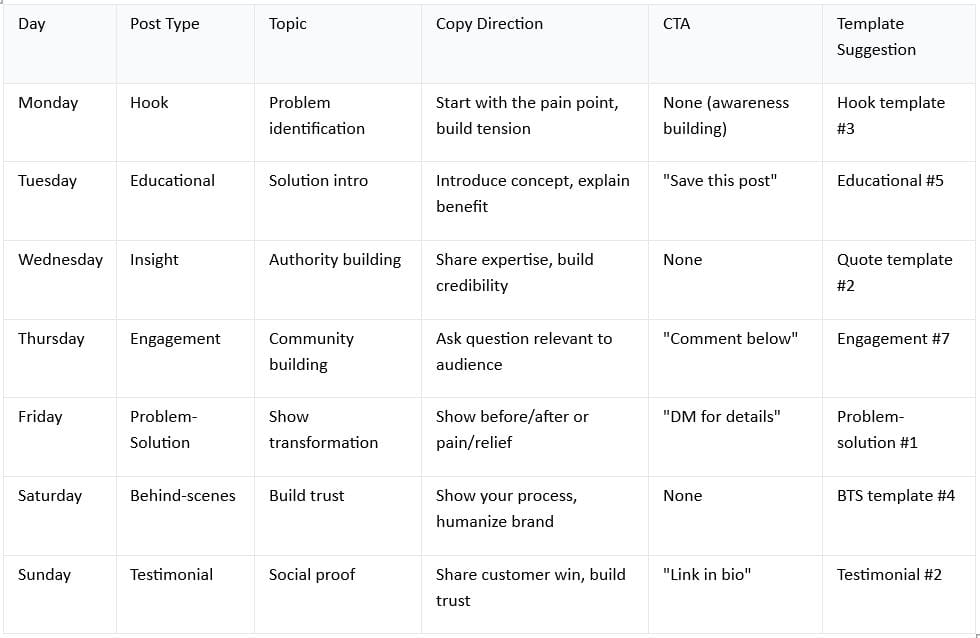
This repeats for weeks 2, 3, and 4
Each day includes:
Post type (what kind of content)
Main topic (what to talk about)
Copy direction (framework for writing)
Call-to-action (what to ask audience)
Template suggestion (which template to use)
How It Works
Without content calendar:
Morning: "What should I post today?"
Brainstorm: 10–15 minutes
Write copy: 15–20 minutes
Design: 10–15 minutes
Total: 35–50 minutes per post
With content calendar:
Morning: Check calendar
Follow copy framework: 5 minutes
Design: 3–5 minutes (using template)
Total: 8–10 minutes per post
Time saved: 25–40 minutes per day
What's Included
4 weeks of daily posts = 28 posts planned
Each with:
Post type
Topic guidance
Copy framework
CTA guidance
Template matching
Quality Assessment
Variety: Excellent
Mix of content types
No repetition
Psychological balance (education + engagement + selling)
Practicality: Very High
You can follow it immediately
No guessing required
Proven content formulas
Flexibility: Good
You can adjust for your niche
Frameworks adapt to different messages
Not too rigid, not too vague
Individual Value
What content calendars cost separately:
Basic calendar template: 15–25
Custom calendar: 30–50
Content planning course: 50–100
4 weeks of consulting: 400–1,000
Conservative value: 50–100
Product 3: Email Sequences (Value: 80–150)
What It Is
5 complete, pre-written email sequences ready to customize and use.
The Breakdown
Sequence 1: Welcome Series (3 emails)
Email 1: Welcome
Subject line provided
Body text provided (you customize)
Purpose: Thank them for subscribing
Goal: Build initial relationship
Typical length: 150–200 words
Email 2: Build Trust
Subject line provided
Body text provided (story or credibility)
Purpose: Establish authority
Goal: Make them want to hear from you
Typical length: 200–300 words
Email 3: Introduce Offer
Subject line provided
Body text provided (soft pitch)
Purpose: Introduce your main product/service
Goal: Prime for future sales
Typical length: 150–200 words
Customization needed: 10–15 minutes (Replace your name, product name, specific benefits)
Sequence 2: Product Launch Series (5 emails)
Email 1: Problem Identification
Subject: "The real reason you're stuck"
Framework: Identify pain point
Goal: Make them feel seen
Length: 200 words
Email 2: Solution Teaser
Subject: "Here's what changed everything"
Framework: Introduce solution
Goal: Build curiosity
Length: 250 words
Email 3: Product Benefits
Subject: "What you get"
Framework: List benefits (not features)
Goal: Show transformation
Length: 200 words
Email 4: Social Proof
Subject: "Real results from real people"
Framework: Testimonials, case studies
Goal: Build credibility
Length: 150 words
Email 5: Urgency/Final CTA
Subject: "Last chance (today only)"
Framework: Create urgency, final pitch
Goal: Drive conversions
Length: 150 words
Customization needed: 20–30 minutes
Sequence 3: Nurture Series (4 emails)
Email 1: Free Value
Give something valuable
No ask
Email 2: More Value
Teach something useful
No ask
Email 3: Story + Soft Pitch
Share experience
Gentle introduction to offer
Email 4: Clear CTA
Direct pitch
Call-to-action
Purpose: Build relationship before hard sell
Sequence 4: Promotional Series (3 emails)
Email 1: Announcement
What: Announce new offer
Goal: Awareness
Email 2: Benefits
Why: Show benefits
Goal: Interest
Email 3: Final CTA
How: Direct them to action
Goal: Conversion
Sequence 5: Re-engagement Series (2 emails)
Email 1: Gentle Re-engagement
Subject: "We miss you"
Goal: Remind them you exist
Email 2: Special Offer
Subject: "Come back for this"
Goal: Incentivize re-engagement
Quality Assessment
Copy Quality: Professional
Proven formulas
Persuasive frameworks
Conversions-focused
Customization: Easy
Simply replace product name
Add your specific benefits
Plug into email platform
Versatility: High
Sequences work for any offer
Easy to adapt
Flexible timing
Individual Value
What email sequences cost separately:
Basic email templates: 20–30
Professional sequences: 50–100
Email copywriting course: 50–150
Hiring copywriter: 1,000–5,000
Conservative value: 80–150
Product 4: Social Media Scripts (Value: 30–50)
What It Is
Pre-written captions, hooks, CTAs, and engagement questions you can customize and use.
The Breakdown
Caption Formulas (20+)
Hook-Driven Captions (5+):
Framework: Start with hook, then explain
Example template: "Nobody talks about this..."
Customization: Change the topic, keep framework
Use: Attention-grabbing posts
Story-Driven Captions (5+):
Framework: Share experience, extract lesson
Example template: "Here's what I learned..."
Customization: Your story, same structure
Use: Build connection, relatability
Problem-Solution Captions (5+):
Framework: Identify problem, offer solution
Example template: "You're probably struggling with..."
Customization: Your problem/solution, same format
Use: Show relevance, position yourself as expert
Benefit-Driven Captions (3+):
Framework: Lead with benefit, explain how
Example template: "Imagine if you could..."
Customization: Your benefit, your how
Use: Product promotion, service promotion
Educational Captions (2+):
Framework: Share tip, explain application
Example template: "Here's a framework that works..."
Customization: Your framework, your example
Use: Thought leadership, authority building
CTA Scripts (15+)
Direct Sales CTAs:
"Link in bio to get started"
"DM for details"
"Tag someone who needs this"
Email CTAs:
"Join my email list (link in bio) for daily tips"
"Subscribe to my newsletter for weekly insights"
Engagement CTAs:
"What's your biggest challenge? Comment below"
"Save this for later"
"Share with someone who needs this"
Discovery CTAs:
"Want to know my full strategy? Reply with 'STRATEGY'"
"Curious how I do this? Link in bio"
Engagement Questions (20+)
Audience-Building Questions:
"What's your biggest struggle with X?"
"What would help you most right now?"
Feedback Questions:
"What resonates most with you?"
"Which is your biggest win?"
Poll Questions:
"Option A or Option B?"
"Which matters more to you?"
Story Questions:
"What's your story?"
"How did you get started?"
Hook Formulas (15+)
Curiosity Hooks:
"I never thought this would work..."
"Nobody talks about this but..."
"Here's what most people get wrong..."
Benefit Hooks:
"Imagine if you could..."
"What if you never had to..."
"Here's how to get..."
Controversial Hooks:
"Most people think X. They're wrong..."
"Everyone tells you X. Here's the truth..."
Story Hooks:
"I made a mistake that changed everything..."
"This one decision transformed my business..."
Quality Assessment
Variety: Excellent
50+ different scripts
Multiple formulas
No repetition
Customization: Easy
Fill-in-the-blanks
Change key words
Keep the structure
Effectiveness: Proven
Formulas based on what works
Conversions-optimized
Tested across industries
Individual Value
What social scripts cost separately:
Basic swipe file: 15–25
Complete caption collection: 25–50
Copywriting course: 50–100
Email copywriting package: 50–100
Conservative value: 30–50
Product 5: Brand Kit (Colors + Fonts) (Value: 20–50)
What It Is
Pre-selected color palette and font pairings that work together.
The Breakdown
Color Palette (4 colors)
Primary Color:
Used in 60–70% of designs
Example: Navy blue
Purpose: Your signature color
Conveys: Brand personality
Secondary Color:
Used in 20–30% of designs
Example: Gold
Purpose: Accent, highlight
Conveys: Sophistication, prestige
Accent Color:
Used in 5–10% of designs
Example: Coral
Purpose: Call-to-action, emphasis
Conveys: Action, urgency
Neutral Color:
Used for text, backgrounds
Example: Dark gray or white
Purpose: Readability, balance
Conveys: Professionalism
How it works:
All 4 colors are tested to work together
Professional combination
Works across all designs
Creates instant recognition
Font Pairing (3 fonts)
Headline Font:
Bold, modern, commanding
Example: Montserrat Bold
Purpose: Attention-grabbing
Use: Post headlines, subject lines
Body Font:
Clean, readable, neutral
Example: Open Sans
Purpose: Readability
Use: Caption text, email body
Optional Accent Font:
Special, distinctive
Example: Playfair Display
Purpose: Branding, elegance
Use: Special headers, logos
How it works:
Fonts are designed to pair well
Professional appearance
Readable on mobile
Creates brand consistency
Why This Matters
Without brand kit:
Every design looks different
No visual consistency
Audience doesn't recognize you
Looks unprofessional
With brand kit:
Every design looks like "you"
Instant brand recognition
Professional appearance
Audience trusts you more
Quality Assessment
Design: Professional
Modern color combinations
Tested pairings
Works on light and dark backgrounds
Practicality: Very High
Easy to implement
Works across all templates
Improves overall brand perception
Individual Value
What brand kits cost separately:
DIY (free): Time value 100–200
Professional brand kit: 200–500
Designer consultation: 500–1,500
Conservative value: 20–50
(The time value of not having to design this yourself)
Product 6: Engagement Framework (Value: 25–50)
What It Is
A daily system for engagement and audience building with specific time allocations.
The Breakdown
Daily Engagement Checklist
Task 1: Respond to Comments (5 minutes)
Reply to all comments on today's post
Use engagement script templates
Keep responses short, genuine
Time: 5 minutes
Task 2: Engage on Other Posts (10 minutes)
Comment on 3–5 other creators' posts
Use comment formulas (provided)
Add value, don't spam
Time: 10 minutes
Task 3: Respond to DMs (5 minutes)
Check and reply to direct messages
Use DM response templates
Keep it personal
Time: 5 minutes
Task 4: Share in Communities (5 minutes)
Post in relevant groups/communities
Share value, not pure sales
Use community guidelines provided
Time: 5 minutes
Task 5: Email Engagement (10 minutes)
Reply to email responses
Engage with email subscribers
Build relationship
Time: 10 minutes
Total daily time: 35 minutes
Engagement Scripts
Comment Response Formulas:
"Great point! Here's what I'd add..."
"Love this perspective. Have you considered..."
"This resonates. I experienced something similar..."
Comment Contribution Scripts:
"This is gold. Especially the part about..."
"So much value here. The insight about X is..."
"Totally agree. I found that X also helps..."
DM Response Scripts:
"Thanks for reaching out! Here's my take..."
"Great question. Here's what works for me..."
"Happy to help. Let me share..."
Community Guidelines
Where to engage:
Relevant Facebook groups
LinkedIn communities
Reddit communities
Slack groups
Discord communities
How to engage:
Answer questions (build authority)
Share insights (provide value)
Reference your content (when relevant)
Build relationships (not selling)
Frequency:
2–3 communities per day
5–10 minutes per community
Consistent (same time daily)
Audience Building Strategy
Week 1: Establish presence
Comment on everything in your niche
Build visibility
Make connections
Week 2-3: Become helpful
Answer questions thoroughly
Share frameworks
Build authority
Week 4+: Leverage relationships
Reference your content
Invite to email list
Build business
Quality Assessment
Practicality: Excellent
Simple, actionable
Specific time allocations
Repeatable daily
Effectiveness: Proven
Engagement builds algorithm favor
Builds relationships
Drives followers and email subscribers
Time Efficiency: High
35 minutes daily
Clear process
No guessing
Individual Value
What engagement systems cost separately:
Social media management course: 25–50
Community building course: 50–100
Done-for-you engagement service: 500–2,000
Conservative value: 25–50
Product 7: Lead Magnet Templates (Value: 40–80)
What It Is
Pre-designed templates for creating lead magnets (free offers to build your email list).
The Breakdown
Checklist Templates (3+)
Structure:
Title
Introduction
10–15 checkbox items
Closing CTA
Types:
Goal-setting checklists
Productivity checklists
Business-building checklists
Health/wellness checklists
How to customize:
Change title
Change items
Change colors (brand kit)
Export as PDF
Value to you:
Builds email list
Provides value
Establishes authority
Free to create
Guide Templates (3+)
Structure:
Cover page
3–5 content pages
Resource page
CTA page
Types:
How-to guides
Framework guides
Strategy guides
Resource guides
How to customize:
Change title
Add your content
Change graphics
Export as PDF
Resource Templates (2+)
What they are:
Compiled list of resources
Recommended tools
Reference materials
Templates collection
Why they work:
People value curated resources
Easy to create
Highly shareable
Builds authority
Swipe File Templates (2+)
What they are:
Collections of copy, subject lines, CTAs
Email templates
Social media captions
Sales language
Why they work:
Extremely valuable
People will opt-in for these
Easy to compile
High perceived value
Quality Assessment
Design: Professional
Branded look
Clean layout
Easy to read
Customization: Easy
Drag-and-drop
Simple edits
Export immediately
Effectiveness: Proven
Lead magnets drive email signups
These templates work
High conversion rates
Individual Value
What lead magnet templates cost separately:
Basic PDF template: 10–20
Professional lead magnet: 20–50
Done-for-you lead magnet: 100–500
Design service: 300–1,000
Conservative value: 40–80
Product 8: Sales Page Templates (Value: 50–100)
What It Is
Pre-designed sales page layouts for selling your products or services.
The Breakdown
Product Sales Page (2+ templates)
Sections included:
Headline (benefit-focused)
Subheadline (qualification)
Hero image/graphic
Problem statement (why they need this)
Solution introduction (what you offer)
Benefits list (what they'll get)
Features breakdown (how it works)
Social proof (testimonials, results)
Objection handling (FAQ)
Price and options
Final CTA (buy now)
Risk reversal (guarantee)
Customization:
Change product name
Change price
Add your testimonials
Update benefits
Keep structure and design
Service Sales Page (1+ templates)
Sections:
Your credibility
The problem your service solves
Your unique approach
Results clients get
Testimonials
Your background/experience
How the service works
Investment/pricing
Application process
Final CTA
Webinar Landing Page (1+ template)
Sections:
Attention-grabbing headline
Problem identification
Webinar topic (solution)
What attendees will learn
Who should attend
Your credibility
Testimonials
Date and time
Registration button
Quality Assessment
Conversion-Optimized:
Based on proven sales page structure
Psychological persuasion principles
Tested conversion formulas
Professional Design:
Modern aesthetic
Mobile-responsive
Clear hierarchy
Customizable:
Easy to adapt
Works for various offers
Simple edits needed
Individual Value
What sales pages cost separately:
DIY template: 10–20
Professional template: 20–50
Done-for-you sales page: 500–2,000
Sales copywriting: 1,000–5,000
Conservative value: 50–100
The Complete Breakdown Summary
All 8 Products at a Glance
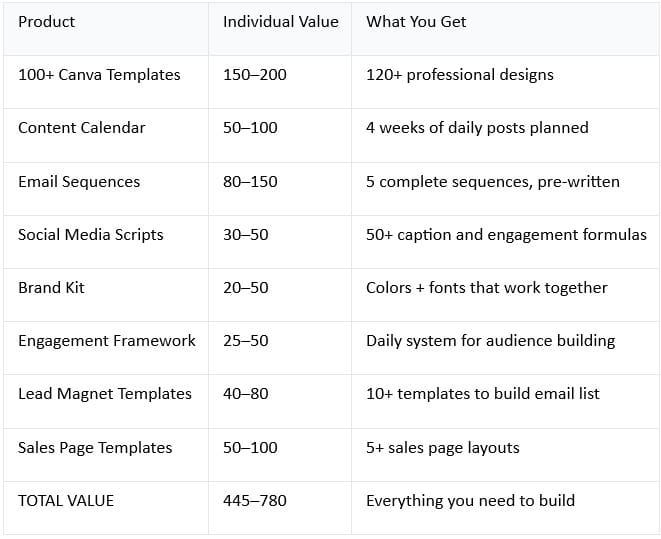
What You're Paying
Kit cost: $67
Value you're getting: 445–780
Discount: 85–91%
How These Work Together (System Perspective)
Week 1: Setup
Use:
Brand kit (implement your colors + fonts)
Canva templates (familiarize yourself)
Content calendar (plan month)
Time: 3–4 hours
Result: Ready to start
Week 2-4: Execution
Use:
Content calendar (what to post)
Canva templates (create posts)
Social scripts (write captions)
Engagement framework (daily engagement)
Time: 30 minutes daily
Result: Consistent posting, growing audience
Month 2+: Email & Sales
Use:
Lead magnet templates (create free offer)
Email sequences (build sales system)
Sales page templates (sell your offer)
Everything above (continue content)
Time: 45 minutes daily
Result: Email list building, sales happening
The Timeline to Profitability
Using this complete kit:
Week 1: Setup, learn system
Week 2-4: Post consistently, build audience
Month 2: Build email list, first affiliate sales possible (0–200)
Month 3: Create product, launch, make first sales (200–1,000)
Month 4+: Scale all revenue streams ($1,000+/month)
Without this kit:
Weeks 1-4: Create everything from scratch (50+ hours)
Month 2: Same activities, slower (more time creating)
Month 3: Finally have systems, making sales (delayed)
Month 4+: Same trajectory, but months behind
The kit accelerates your timeline by 4–8 weeks.
Special Offers & Bonuses
What's Included Beyond The 8 Products
Bonus 1: Implementation Checklist
Step-by-step setup guide
What to do day 1, week 1, month 1
Ensures you use everything
Bonus 2: Email Template Swipe File
50+ ready-to-use email copies
Different formats and approaches
Just customize and send
Bonus 3: Funnel Template Bundle
Complete sales funnel templates
Email optin → nurture → sales
All integrated
Bonus 4: Content Framework Guide
How to create different content types
Why each type matters
When to use each
Who This Is Actually For
Perfect Fit
✅ Busy entrepreneurs (need content fast)
✅ Camera-shy creators (all faceless content)
✅ Digital product sellers (email + sales systems)
✅ Beginners (everything included)
✅ Anyone with limited time (saves 20–30 hours/month)
✅ People with limited budget (huge value at $67)
Good Fit (With Some Customization)
✅ Video creators (templates are mostly image-based)
✅ Established creators (still useful for reference)
✅ Designers (might not need templates, but scripts are valuable)
Not A Perfect Fit
❌ Professional designers (might not use templates)
❌ Video-only strategies (limited video templates)
❌ Highly specialized niches (may need customization)
Pricing Context
Why $67?
Cost to create this kit separately: 2,000–5,000
Designer time: 100+ hours (2,000–5,000)
Template creation: 50+ hours
Script writing: 20+ hours
Sequencing: 15+ hours
Value delivered to you: 445–780
Price: $67
Why so cheap?
Selling to many people (economy of scale)
Digital product (no cost per unit)
Want to make it accessible
Wants to help more people succeed
Is the price going up?
Current price is launch price
Likely to increase as popularity grows
Lock in at $67 while available
Your Next Step
What To Do Now
Option 1: Get Instant Access
Buy now at $67
Get all 8 products immediately
Start implementing today
See results in weeks
Option 2: Think About It
Risk: Price increases
Risk: Miss launch bonus
Reality: You'll probably buy eventually (might pay more)
Option 3: Wait For More Info
Understandable
But everything is explained above
No hidden features
What you see is what you get
Final Thoughts
The Real Question
Not "Is this worth $67?"
The real question is: "Can I afford NOT to have this?"
Because the alternative is:
Spend 50+ hours creating everything yourself
OR spend 500–2,000 hiring someone
OR stay stuck without systems
OR succeed slower
At $67, with a potential 10–20x ROI in the first month, this is one of the best business investments you can make.
The Truth
You don't need this to succeed
You can create everything yourself
But you'll spend more time and money
This accelerates your timeline significantly
The money you make in the first month pays for it 10x over
$67 for 445–$780 worth of professional templates, systems, and frameworks.
Copyright © 2022 SuePats.com - nubeginning.com | All Rights Reserved | PRIVACY POLICY - TERMS & CONDITIONS - DISCLAIMER