

Sue Pats
Why Done-For-You Canva Templates Save Serious Content Creators Hours Every Week
Introduction: The Hidden Cost Of Creating Templates From Scratch
Most content creators don't realize how much time they're actually spending on design.
They see it as:
5 minutes to create one Instagram post
10 minutes for a carousel
15 minutes for a Reel graphic
"Not that bad," they think.
But let's do the actual math.
The Real Time Cost
If you create content daily:
Monday: 1 post = 5 minutes
Tuesday: 1 carousel = 10 minutes
Wednesday: 1 Reel graphic = 15 minutes
Thursday: 1 post = 5 minutes
Friday: 1 post = 5 minutes
Saturday: 1 carousel = 10 minutes
Sunday: 1 post = 5 minutes
Total weekly: 55 minutes of design work
Monthly: 220 minutes (3.7 hours)
Yearly: 2,860 minutes (47.7 hours)
That's almost a full work week spent designing posts.
But here's where it gets worse.
The Hidden Time Costs
The 55 minutes doesn't include:
Decision fatigue
Choosing which template to use
Deciding on colors
Figuring out fonts
Testing layouts
(Add 10–15 minutes per week)
Switching costs
Opening Canva
Finding your brand kit
Searching for templates
Waiting for things to load
(Add 5–10 minutes per week)
Revisions
First draft doesn't look right
You redo it
You redo it again
(Add 10–20 minutes per week)
Consistency checking
Does this match my other posts?
Should I change the colors?
Are the fonts consistent?
(Add 5–10 minutes per week)
Real weekly time: 85–125 minutes (1.4–2 hours)
Real yearly time: 73–260 hours (2–6.5 weeks of full-time work)
What This Actually Costs You
If you value your time at $50/hour (conservative for content creators):
Monthly cost of creating templates from scratch: 350–650
Yearly cost: 4,200–7,800
You're spending thousands of dollars worth of time creating designs.
And most creators don't realize it because it's spread across weeks and months.
The Done-For-You Solution
What if you could cut this time by 80–90%?
Instead of 85–125 minutes per week, you spend 10–15 minutes per week.
You save 75–110 minutes per week.
That's 4–5 hours per week. Per month that's 16–20 hours saved.
Per year: 832–1,040 hours saved.
At 50/hour, that′s 41,600–$52,000 in time savings per year.**
You could buy a done-for-you template kit for $67 and save $41,600+ per year.
That's a 62,090% return on investment.
Let me say that again: 62,090% ROI on your time.
This post shows you exactly how.
Part 1: Where Content Creators Actually Lose Time
Loss 1: Template Selection Paralysis (20–30 minutes/week)
The scenario:
You sit down to create a post. Before you create anything, you spend time deciding.
"Should I use a motivational quote template? Or an educational template? Or a carousel? Or a single image post?"
You search "Instagram post templates." You get 5,000 results.
You start scrolling.
20 minutes later: You finally pick one.
Then you realize: It's not quite right. You look for a different one.
10 more minutes: You find another.
Total time on template selection: 30 minutes
What you could have done in 30 minutes: Created 6 posts instead of agonizing over 1.
Weekly impact: 3–4 hours lost to template selection paralysis
Loss 2: Design Inconsistency Rework (15–25 minutes/week)
The scenario:
You finish a post. It looks good.
But then you look at it next to yesterday's post.
The colors are slightly different. The font is different. The vibe doesn't match.
So you go back and redo it.
Then you realize last week's posts don't match either.
So you redo those.
This rabbit hole eats 45 minutes.
You've now spent 45 minutes on one post (which was supposed to take 5 minutes).
Weekly impact: 2–3 hours reworking posts for consistency
Loss 3: Design Decision Fatigue (10–20 minutes/week)
The scenario:
Every post, you make decisions:
What color should this be?
Should I use this font or that font?
Should the text be left-aligned or centered?
Should I add an image or keep it text-only?
Should I use this icon or that icon?
Each decision takes 30–60 seconds. But when you make 5–10 decisions per post, it adds up.
And decision fatigue is real. By the 5th decision, your brain is tired. The quality of your decisions drops.
Weekly impact: 1–2 hours spent making design decisions
Loss 4: Tool Context Switching (5–10 minutes/week)
The scenario:
You're in the middle of writing content. You decide to create a graphic.
You:
1. Leave your document
2. Open Canva
3. Wait for it to load
4. Navigate to your files
5. Find the right template
6. Wait for it to load
This switching back and forth creates friction.
Now you're in the flow of creating. You stop. You switch tools. Your momentum breaks.
Weekly impact: 30–60 minutes lost to tool switching and context loss
Loss 5: Creating New Designs When Similar Ones Exist (20–30 minutes/week)
The scenario:
You want to create a motivational post.
You search for a motivational template.
You don't like the first 10 results.
So you start customizing one from scratch instead of searching for a better one.
You spend 15 minutes creating something that already exists in template form.
Then next week, you need another motivational post.
Instead of reusing or tweaking what you created, you start from scratch again (because you forgot what you did last week).
Weekly impact: 1–2 hours recreating similar designs
Loss 6: Waiting For Design To Load (5–15 minutes/week)
The scenario:
Canva is slow sometimes. Designs take time to load. Images take time to upload. Downloads take time.
When you're using templates from scratch, these waits add up.
Weekly impact: 15–30 minutes waiting for technology to catch up
Loss 7: Overthinking The Design (15–25 minutes/week)
The scenario:
You finish a design. But you're not sure if it's good.
Is the text too big? Too small? The colors look weird in this lighting. Does the layout make sense?
You second-guess yourself.
You show it to a friend. They say it looks fine. But you're still unsure.
You spend 20 minutes tweaking it when it was already good.
Weekly impact: 1–2 hours overthinking designs
The Grand Total
Add it all up:
Template selection: 30 minutes
Inconsistency rework: 45 minutes
Decision fatigue: 15 minutes
Context switching: 10 minutes
Recreating existing designs: 20 minutes
Technical waiting: 10 minutes
Overthinking: 20 minutes
Total per week: 150 minutes (2.5 hours)
Some weeks it's less. Some weeks it's more (like when you're launching something big).
Conservative estimate: 1.5–3 hours per week lost to design friction
That's 78–156 hours per year.
At 50/hour,that′s 3,900–$7,800 per year in lost time.**
Part 2: The Done-For-You Template Difference
How Done-For-You Templates Eliminate Time Waste
The key difference: Done-for-you templates come pre-designed.
You don't design them. Someone else did.
You just customize them.
Loss 1 Eliminated: No Template Selection Paralysis
Old way:
Search for template
Scroll through 5,000 options
Can't decide
30 minutes wasted
New way:
Open your template library
You have 50+ templates already selected for you
Pick the one that fits your post idea
2 minutes
Time saved: 28 minutes per post
If you post daily: 196 minutes per week saved (3.3 hours)
Loss 2 Eliminated: Perfect Design Consistency
Old way:
Every template is from different designers
Colors don't match across templates
Fonts are inconsistent
You redo posts constantly
45 minutes rework time per week
New way:
All 100+ templates are from the same design system
Colors match across all templates
Fonts are consistent
Brand kit is built-in
0 minutes rework time
Time saved: 45 minutes per week
Loss 3 Eliminated: Design Decisions Already Made
Old way:
Every post = 5–10 design decisions
Decision fatigue sets in
Takes 15 minutes just to decide on colors and fonts
New way:
Design decisions already made
You just pick a template (decision already made)
You customize the text (no design decision needed)
Takes 2 minutes to be "done"
Time saved: 13 minutes per post
If you post 5x per week: 65 minutes per week saved (1 hour)
Loss 4 Eliminated: No Tool Switching
Old way:
Context switch between writing and design
Flow breaks
Takes 5–10 minutes to get back into flow
New way:
Entire workflow is in Canva
No switching
Flow continues uninterrupted
Time saved: 30 minutes per week
Loss 5 Eliminated: Leverage Existing Templates Instead Of Recreating
Old way:
Create a motivational post
Next week, forget what you did
Create another motivational post from scratch
Recreate similar designs weekly
20–30 minutes per week wasted
New way:
Use "motivational template 1" for post 1
Use "motivational template 2" for post 2
Use "motivational template 3" for post 3
Never recreate. Always leverage existing designs.
0 minutes wasted
Time saved: 25 minutes per week
Loss 6 Eliminated: Faster Loads
Old way:
Search for templates
Wait for them to load
Upload images
Wait for those to load
Download
Wait for download to finish
Total tech-waiting time: 10 minutes per post
New way:
Templates are already loaded in your library
Images are already in place (you customize)
Quick customization
Download instantly
Total tech-waiting time: 1 minute per post
Time saved: 9 minutes per post
If you post 5x per week: 45 minutes per week saved
Loss 7 Eliminated: Professional Results Built-In (No Overthinking)
Old way:
You finish a design
You're unsure if it looks good
You overthink it
You ask friends for feedback
You redo it
20 minutes wasted on something that was already good
New way:
You customize a professional template
It looks professional automatically (because the template is professional)
You don't overthink (because it's already designed well)
0 minutes wasted
Time saved: 20 minutes per week
The Grand Total: Time Saved Per Week
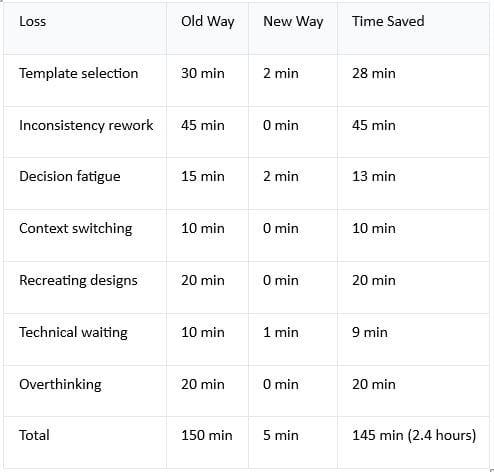
You save 2.4 hours per week.
That's 10 hours per month.
That's 120 hours per year.
The Financial Value
At $50/hour: 120 hours × 50=∗∗6,000 per year saved**
At $75/hour: 120 hours × 75=∗∗9,000 per year saved**
At $100/hour: 120 hours × 100=∗∗12,000 per year saved**
And remember: You're paying $67 for the template kit.
Your ROI:
At $50/hour: $6,000 ÷ $67 = 8,955% return
At $75/hour: $9,000 ÷ $67 = 13,433% return
At $100/hour: $12,000 ÷ $67 = 17,910% return
You pay $67 once. You save 6,000–12,000 per year for life.
Part 3: The Quality Multiplier Effect
Better Designs = More Engagement = More Revenue
Here's what most people miss:
The time saved isn't even the biggest benefit.
The biggest benefit is quality improvement.
Done-for-you templates aren't just pre-made. They're professionally designed.
Professional design = higher engagement = more revenue.
The Math On Engagement
Let's say you're a content creator with 10,000 Instagram followers.
Current engagement (using okay templates):
2% engagement rate = 200 engagements per post
0.5% click-through to website = 50 clicks per post
5% conversion rate = 2.5 customers per post
Using professional templates:
4% engagement rate = 400 engagements per post
1% click-through rate = 100 clicks per post
5% conversion rate = 5 customers per post
You doubled your customer acquisition. Just from better design.
Why Professional Templates Get Better Engagement
Reason 1: Trust
Professional design signals legitimacy. People trust professional-looking accounts more.
A designed-from-scratch template might look amateur. Professional templates look established.
Result: Higher click rates, more conversions.
Reason 2: Readability
Professional templates follow design best practices:
Text is readable
Colors have contrast
Hierarchy is clear
Your eye knows exactly where to look.
Versus a template you created yourself, which might have:
Text too small
Colors that don't contrast
No visual hierarchy
Result: More people read your content. More engagement.
Reason 3: Psychology
Professional designers use psychological principles:
Color psychology (colors that trigger action)
Typography psychology (fonts that convey trust)
Layout psychology (layouts that guide eye to CTA)
Your amateur template doesn't use these principles.
Result: Professional templates get more conversions.
Reason 4: Consistency
As mentioned earlier, consistent design builds trust.
People follow accounts that look established and professional.
Professional templates ensure consistency automatically.
Result: More followers, more loyal audience.
Real Revenue Impact
If you're a digital product seller:
Current state:
5 customers per day at $97 = $485/day
$14,550/month
$174,600/year
Using professional templates (2x better conversion rate):
10 customers per day at $97 = $970/day
$29,100/month
$349,200/year
That's $174,600 more per year.
And it came from better design (from using professional templates).
The template kit cost $67 and generated $174,600 in additional annual revenue.
Your ROI: 260,597%
Time Saved + Quality Improved = Compound Effect
Here's the thing most people miss:
Done-for-you templates don't just save time.
They also improve quality.
Usually, there's a tradeoff:
Save time = lose quality (DIY designs)
Improve quality = lose time (hiring designers)
Done-for-you templates break this tradeoff.
You get both:
✅ Save 2+ hours per week
✅ Improve design quality
✅ Increase engagement
✅ Increase conversions
✅ Increase revenue
It's the rare win-win-win-win.
Part 4: The Real-World Application (Who Benefits Most?)
The Busy Entrepreneur
Scenario: You run a coaching business. You know you need to post on Instagram, but you're swamped.
Before templates:
Spend 2–3 hours per week on Instagram graphics
Design is mediocre (you're not a designer)
Engagement is okay but not great
You're thinking about quitting Instagram because it's too time-consuming
After done-for-you templates:
Spend 20 minutes per week on Instagram graphics
Design is professional (templates are professional)
Engagement increases 50–100% (better design)
Instagram becomes something you enjoy instead of dread
Time ROI: Save 2.5 hours per week = 10 hours per month = 120 hours per year
The Digital Product Seller
Scenario: You sell e-books, courses, templates. You need consistent content to drive traffic.
Before templates:
Spend 3+ hours per week designing promotional graphics
Designs are inconsistent (you're juggling multiple design styles)
Some posts convert well, some don't
You're not posting consistently because design takes too long
After done-for-you templates:
Spend 30 minutes per week designing promotional graphics
Designs are consistent (all from same system)
Conversion rates improve (professional design + consistency)
You post daily (because it's so fast)
Time ROI: Save 2.5 hours per week
Revenue ROI: Your conversion rate increases, so you sell more products
The Camera-Shy Creator
Scenario: You want to build an audience, but you don't want to be on camera.
Before templates:
You're not posting because creating graphics feels like too much work
You're stuck (you want to build an audience but the process feels overwhelming)
After done-for-you templates:
You post daily (takes 5 minutes per post)
No camera needed (templates are all graphics-based)
You build an audience without being on camera
You're finally moving forward
Time ROI: Eliminates the barrier entirely
The Content Creator With No Design Skills
Scenario: You're a writer. You can write amazing captions, but you can't design to save your life.
Before templates:
You hire a designer (500–\1,000 per month)
You wait 3–5 days for designs
You can't post spontaneously
After done-for-you templates:
You design yourself (takes 5 minutes)
You post instantly
You save 500–1,000 per month on design
You maintain full control of your content
Financial ROI: Save 6,000–12,000 per year
The Solopreneur Scaling Their Business
Scenario: Your business is growing. You need more content but you can't hire someone yet (too expensive).
Before templates:
You're the bottleneck (you're doing everything)
You spend more time on design than on selling
You're exhausted
After done-for-you templates:
Design is no longer a bottleneck
You can focus on selling
You free up time to grow
You're not exhausted
Business Impact: You can scale without hiring
Part 5: The Complete Package (What You Actually Get)
The Faceless Marketing Kit ($67) includes done-for-you templates for everything you need.
Instagram Templates (100+)
Motivational quotes (5+ templates)
Educational carousels (10+ templates)
Product showcases (8+ templates)
Behind-the-scenes (5+ templates)
Engagement posts (10+ templates)
Tips and tricks (15+ templates)
Testimonials (5+ templates)
Value propositions (10+ templates)
Series templates (10+ templates)
Social proof (8+ templates)
Story templates (5+ templates)
Reel templates (8+ templates)
All designed to match each other. All ready to customize. All professional quality.
Bonus Templates
Email templates (50+) — for email marketing Content calendars — for planning Social media scripts — for copywriting Lead magnet templates — for list building Sales page templates — for selling Brand guide templates — for consistency
The Time & Money Value
What you're getting:
If you bought these templates separately:
Instagram templates: $150
Email templates: $75
Content calendars: $30
Social media scripts: $40
Lead magnet templates: $50
Sales pages: $31
Total value: $376
What you pay: $67
You're getting $376 worth of templates for $67.
That's an 461% discount.
The Time Value
If you're spending 2.5 hours per week on design:
Per month: 10 hours saved = 500–1,000 in time value (at market rates)
Per year: 120 hours saved = 6,000–12,000 in time value
You pay $67 once and save $6,000+ per year for life.
Conclusion: The Math Is Overwhelming
Let's be clear about what done-for-you templates actually deliver:
Time saved: 2.5 hours per week = 120 hours per year = 6,000–12,000 in time value
Quality improvement: 50–100% more engagement = hundreds to thousands more in revenue
Cost: $67 (one-time)
ROI: 8,955% minimum (using conservative $50/hour value)
Payback period: Less than 1 week of time saved
Serious content creators who understand the value of their time are using done-for-you templates.
It's not about being lazy.
It's about being efficient.
It's about focusing your energy on what matters (creating great content, building audience, making sales) instead of wrestling with design tools.
100+ professional Canva templates (376 value) for \67.
Save 2.5+ hours per week. Start today.
Your time is too valuable to spend it designing from scratch.
Copyright © 2022 SuePats.com - nubeginning.com | All Rights Reserved | PRIVACY POLICY - TERMS & CONDITIONS - DISCLAIMER