

Sue Pats
Stop Designing From Scratch. Here Is A Better System For Instagram Content
Introduction: The Instagram Content Trap
You want to grow on Instagram.
You know consistent posting is key. The algorithm rewards daily content. Your audience expects regular posts.
So you commit: "I'm going to post daily."
For the first week, it's exciting. You create posts. You get some engagement.
By week two, reality hits.
The problem: Creating content from scratch is exhausting.
Here's what your actual process looks like:
Monday:
30 minutes: Brainstorm post idea
15 minutes: Write caption
20 minutes: Search for design template
25 minutes: Customize template
10 minutes: Second-guess design, make changes
5 minutes: Upload to Instagram
Total: 1 hour 45 minutes for one post
You do this 5 days a week.
That's 8.75 hours per week.
You're exhausted. You miss a day. Then you miss two days. By week three, you've stopped posting.
Sound familiar?
The Cycle That Kills Content Consistency
Week 1: "I'm posting every day!" Week 2: "This is taking forever..." Week 3: "Maybe I'll post 3 times a week instead" Week 4: "I'm too busy for this" Week 5: "I'll come back to Instagram when things calm down"
Six months later: You haven't posted in months.
This isn't a motivation problem. It's a system problem.
Your system (designing from scratch) is broken.
Why Designing From Scratch Doesn't Work
Problem 1: Decision Fatigue
Every post requires 10+ decisions:
What template should I use?
What colors?
What fonts?
Should I add images?
What message?
Where should the text be?
Should it be a carousel or single post?
What hashtags?
By the 10th decision, your brain is fried.
Problem 2: It's Slow
Even experienced designers spend 30+ minutes per post. Beginners spend 45+ minutes.
If you post daily, that's 3.5–5+ hours per week just on design.
Problem 3: Inconsistent Results
Each post is designed differently. No cohesive brand. No consistent look.
This confuses your audience. They don't recognize your content.
Problem 4: Quality Fluctuates
Some posts look great. Some look mediocre. Some look bad.
You rush the Friday post. It shows.
Problem 5: It's Mentally Exhausting
You finish a post and you're not sure if it looks good. You overthink it. You redo it. You're still unsure.
The mental load is heavy.
What If There Was A Better Way?
What if you could:
✅ Create professional Instagram posts in 5 minutes
✅ Post daily without burning out
✅ Maintain consistent branding automatically
✅ Never second-guess your designs
✅ Save 10+ hours per week
✅ Actually enjoy Instagram again
There is a better way.
It's called a content system.
And this guide shows you exactly how to build one.
Part 1: What A Real Content System Looks Like
The Traditional Approach (Broken)
Step 1: Decide what to post about "What should I post today?" You think about it. You brainstorm. You overthink. Time: 20–30 minutes
Step 2: Search for a template You open Canva. You search "Instagram post template." 5,000 results appear. You scroll through dozens. You can't decide. Time: 15–20 minutes
Step 3: Customize the template You pick a template. You change the text. You change the colors. You add images. You adjust the layout. Time: 20–30 minutes
Step 4: Review and second-guess You look at it. You're unsure. You change things. You change them back. You show it to a friend. Time: 10–15 minutes
Step 5: Export and upload You download. You upload to Instagram. You add caption. Time: 5 minutes
Total time: 70–100 minutes per post
If you post 5x per week: 350–500 minutes (5.8–8.3 hours)
The Better System (Proven)
Step 1: Open your content calendar You already know what to post (it's planned). You don't brainstorm daily. You batch plan weekly. Time: 0 minutes (already done)
Step 2: Choose a template from your library You have 50+ pre-made, professionally designed templates. You pick one that matches your post idea. It takes 30 seconds. Time: 0.5 minutes
Step 3: Customize in 2 minutes Change the text. Done. Everything else (colors, fonts, layout) is already perfect. Time: 2–3 minutes
Step 4: Export and upload Download. Upload. Caption. Done. No second-guessing because the template is professionally designed. Time: 2 minutes
Total time: 5 minutes per post
If you post 5x per week: 25 minutes
The Time Savings
Old system: 5.8–8.3 hours per week
New system: 0.4 hours per week
Time saved: 5.4–7.9 hours per week
That's 22–31 hours per month.
That's 264–372 hours per year.
At a conservative 50/hour,that′s 13,200–$18,600 per year in time savings.**
Why This System Actually Works
Reason 1: No Decision Fatigue
You're not making 10+ decisions per post.
You're making 1 decision: "Which template fits this idea?"
That's it.
Your brain stays fresh.
Reason 2: Speed Creates Consistency
When you post daily, consistency compounds.
With the old system, you post 2–3 times per week (because it takes too long).
With the new system, you post 5+ times per week (because it takes 5 minutes).
Consistency beats everything on Instagram.
Reason 3: Professional Design = Confidence
You finish a post in 5 minutes.
You're not second-guessing it because it's professionally designed.
You upload with confidence.
Confidence shows. Your audience feels it.
Reason 4: Batch Planning = Less Stress
Instead of thinking "what should I post today?" every morning, you plan once per week.
Monday morning: Spend 1 hour planning content for the entire week.
Then you execute daily without thinking.
No daily stress. No daily decisions.
Part 2: The Core Components Of A Winning Content System
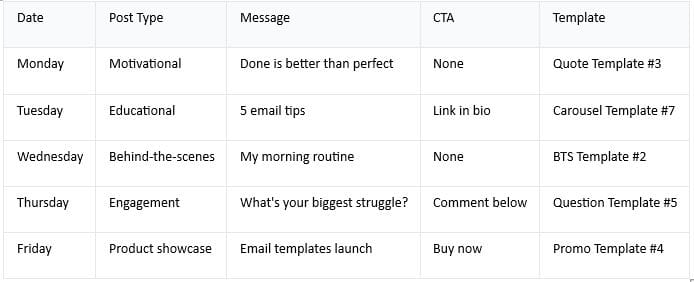
Component 1: A Pre-Planned Content Calendar
What it is: A document (Google Sheets, Notion, or even paper) that shows what you'll post each day.
Why it matters: When you wake up, you already know what to post. No brainstorming. No overthinking.
What to include:
Date of post
Post type (motivational quote, educational carousel, product showcase, etc.)
Main message/hook
CTA (call-to-action)
Which template to use
Any images/graphics needed
Example:
Benefits:
No daily brainstorming
You're prepared a week in advance
You batch-create all content Friday-Sunday
Rest of the week you just execute
Reduces stress dramatically
Time investment: 1 hour per week (Sunday planning)
Time savings: 2+ hours per week (no daily brainstorming)
Component 2: A Template Library (100+ Professional Templates)
What it is: A collection of pre-designed, professionally made Instagram templates.
All templates:
Match each other (consistent brand)
Follow design best practices
Are customizable in Canva
Take 5 minutes to customize
Look professional automatically
Template categories:
Hook templates (stop the scroll)
Controversy hook
Quiz hook
"Wait for it" hook
Number reveal
Educational templates (provide value)
Tips carousel
How-to breakdown
Myth vs. reality
Before/after transformation
Engagement templates (build community)
Question prompts
Fill-in-the-blank
Poll-style
"Tag someone who..."
Selling templates (drive conversions)
Limited time offer
Product showcase
Social proof
Free + paid offer
Brand-building templates (establish authority)
Motivational quotes
Personal story
Behind-the-scenes
Value proposition
Benefits:
No searching for templates
Consistent brand across all posts
Professional quality guaranteed
Mix and match based on content plan
Saves hours on design
Component 3: A Batch Creation Schedule
What it is: A specific time each week when you sit down and create all your posts for that week.
Why it works: Instead of creating one post daily (5 separate 5-minute sessions + context switching), you create 5 posts in one 30-minute session.
Your brain is in "creation mode" for 30 minutes. You're efficient. You're focused.
The schedule:
Sunday 10 AM–11 AM: Planning
Review this week's content calendar
Decide if anything needs adjustment
Gather any images/graphics needed
Sunday 11 AM–12:30 PM: Creation
Open Canva
Customize template 1 (5 minutes)
Customize template 2 (5 minutes)
Customize template 3 (5 minutes)
Customize template 4 (5 minutes)
Customize template 5 (5 minutes)
Download all 5
Total time investment: 1.5 hours per week
Posts created: 5
Time per post: 18 minutes (including planning)
Compare to old system: 70–100 minutes per post
Savings: 52–82 minutes per post
Weekly savings: 4.3–6.8 hours
Benefits:
Batch creation is more efficient
One session per week = less stress
You can schedule posts in advance
Rest of week is execution only (takes 1 minute to upload and caption)
Component 4: A Consistent Posting Schedule
What it is: A specific time each day when you post.
Why it matters: Instagram rewards consistency. Same time every day = algorithm favors you.
Example schedule:
Monday: 9 AM
Tuesday: 9 AM
Wednesday: 9 AM
Thursday: 9 AM
Friday: 9 AM
Saturday: (optional)
Sunday: (optional)
Benefits:
Algorithm rewards consistency
Your audience knows when to expect new content
You build a habit (same time every day)
No more "should I post now or later?" overthinking
Component 5: Performance Tracking
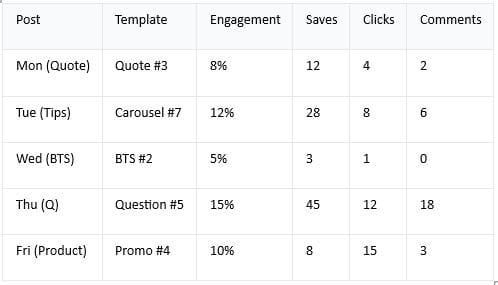
What it is: A simple sheet where you track which posts perform best.
Why it matters: You learn what works. You do more of that. You drop what doesn't work.
What to track:
Insights:
Questions get highest engagement (use more)
Carousels get most saves (use more)
BTS underperforms (remove from rotation)
Product posts drive most clicks (use when selling)
Benefits:
Data-driven decisions
You know what works
You optimize over time
No more guessing
Part 3: How To Build Your System In One Week
Day 1: Get Your Templates (30 minutes)
Option 1: Download Done-For-You Templates
Buy the kit ($67)
Download all 100+ Canva templates
You now have a complete template library
Time: 15 minutes
Cost: $67
Benefit: 100+ professional templates ready to use
Option 2: Create Templates From Scratch (Not Recommended)
This takes 20+ hours
Requires design skills
Is expensive to outsource (500–\2,000)
I recommend Option 1.
Day 2: Set Up Your Content Calendar (1 hour)
Step 1: Open Google Sheets or Notion
Step 2: Create a calendar for the next 4 weeks
Step 3: Fill in post ideas for each day
Use this framework:
Monday: Motivational/inspirational content (builds connection) Tuesday: Educational carousel (provides value) Wednesday: Behind-the-scenes (builds trust) Thursday: Engagement question (builds community) Friday: Product/offer (makes money) Saturday/Sunday: Optional (or lighter content)
Example posts:
Monday: "Done is better than perfect. Start today."
Tuesday: "5 email marketing mistakes most people make"
Wednesday: "A day in my life building digital products"
Thursday: "What's your biggest content challenge? Comment below"
Friday: "Canva templates that save you 20 hours per month. Link in bio."
Time: 1 hour
Day 3: Match Templates To Content Ideas (30 minutes)
Step 1: Open your Canva template library
Step 2: For each day's post idea, assign a template
Example:
Monday "Done is better than perfect" → Use Quote Template #3
Tuesday "5 email tips" → Use Carousel Template #7
Wednesday "Day in my life" → Use BTS Template #2
Thursday "What's your struggle?" → Use Question Template #5
Friday "Canva templates" → Use Product Template #4
Time: 30 minutes
Day 4: Batch Create Your First Week (1.5 hours)
Step 1: Set aside 1.5 hours of uninterrupted time
Step 2: Open Canva
Step 3: Open Template #1 (Quote Template #3)
Step 4: Change the text to your quote
Step 5: Download
Repeat for templates 2–5
Time: 1.5 hours to create 5 posts
Result: You have one week of content ready
Day 5-7: Upload And Caption (Daily)
Each day:
Open Instagram
Upload today's post (already created)
Write caption (takes 5 minutes)
Add hashtags
Post
Time per day: 5 minutes
Total time for week: 25 minutes
Part 4: The System In Action (6-Week Timeline)
Week 1: You Start The System
Sunday: You plan 5 posts, create them in 1.5 hours
Monday-Friday: You upload 1 post per day (5 minutes each)
Total time: 2.5 hours
Result: 5 professional posts, consistent brand, zero stress
Week 2: You're Finding Your Rhythm
Sunday: You plan next week's content. You notice some posts performed better. You double down on what works.
Monday-Friday: You upload daily
Total time: 2.5 hours
Result: You're starting to see engagement patterns. Your audience is responding.
Week 3: Momentum Building
Sunday: Planning is faster (you know the framework now)
Monday-Friday: Daily posts continue
Your followers start expecting posts at 9 AM. Algorithm notices the consistency.
Total time: 2.5 hours
Result: Engagement is increasing. People are commenting more. You're building community.
Week 4: You've Made It A Habit
Sunday: Planning takes 30 minutes (faster)
Monday-Friday: You post without thinking. It's automatic.
Total time: 2 hours
Result: You've posted 20 times this month. Last month you posted 5 times. Your engagement has tripled.
Week 5-6: The Compound Effect
By week 6, something shifts.
Your audience is engaged. People comment regularly. Your saves are up. Your clicks are up.
New followers are arriving daily. The consistency is paying off.
You're getting DMs from people interested in what you're selling. The algorithm is promoting your content because engagement is high.
You've spent 10 hours this month on content creation. If you were doing it the old way (70 minutes per post), you would have spent 140+ hours.
You saved 130 hours.
At 50/hour,that′s 6,500 in time savings in month 1 alone.**
Part 5: Why Most People Fail (And How You Won't)
Failure Pattern 1: No System
What they do: Post randomly. Design from scratch each time. No planning.
Why they fail: It's too hard. They burnout. They quit.
How you avoid it: You have a system. You follow it. It works.
Failure Pattern 2: Inconsistent Posting
What they do: Post Monday, Tuesday, skip Wednesday-Friday, post Saturday.
Why they fail: Algorithm doesn't reward inconsistency. Audience doesn't know when to expect content.
How you avoid it: You post at the same time every day. Algorithm loves it. Audience expects it.
Failure Pattern 3: No Brand Consistency
What they do: Every post looks different. No cohesive brand. Audience doesn't recognize their content.
Why they fail: Followers don't know if a post is from them or someone else. They keep scrolling.
How you avoid it: All templates match. All posts look like they're from you. Audience recognizes you immediately.
Failure Pattern 4: No Measurement
What they do: They post and hope. They don't track what works.
Why they fail: They repeat what doesn't work. They drop what does work. They spin their wheels.
How you avoid it: You track performance. You double down on winners. You drop underperformers.
Failure Pattern 5: Design Perfectionism
What they do: Spend 45 minutes perfecting one post. Overthink. Never satisfied.
Why they fail: Takes too long. Hard to be consistent. Exhausting.
How you avoid it: Templates are already professional. You trust them. No overthinking. 5 minutes and you're done.
Part 6: Your Complete System (In One Place)
Here's what a complete Instagram content system includes:
Template Library (100+ Templates)
✅ Hook templates (stop the scroll)
✅ Educational templates (provide value)
✅ Engagement templates (build community)
✅ Sales templates (drive revenue)
✅ Brand-building templates (establish authority)
Where to get: Faceless Marketing Kit ($67 for 100+ templates)
Content Calendar (4-Week Plan)
✅ Daily post ideas planned in advance
✅ Post type assigned to each day
✅ Main message for each post
✅ Template assigned to each post
Where to get: Google Sheets template (create yourself)
Batch Creation Schedule
✅ 1.5 hours per week to create 5 posts
✅ Sunday morning is your creation time
✅ Templates speed up the process
Where to get: Choose your schedule (make it a calendar event)
Consistent Posting Schedule
✅ Same time every day (e.g., 9 AM)
✅ Monday-Friday posting (minimum)
✅ Calendar reminder set
Where to get: Your phone calendar
Performance Tracking
✅ Sheet tracking engagement by post
✅ Notes on what performs best
✅ Monthly review of what works
Where to get: Google Sheets (create yourself)
Bonus: Captions & Copy
✅ The Faceless Marketing Kit includes social media scripts
✅ Pre-written captions you can customize
✅ CTAs that convert
✅ Hooks that stop scrolls
Conclusion: This Is The System That Works
You now understand:
✅ Why designing from scratch is broken (it takes too long, causes burnout)
✅ What a real system looks like (templates, calendar, schedule, tracking)
✅ How to build it in one week (templates, calendar, batch creation)
✅ Why it actually works (consistency, quality, speed)
The only question is: Will you implement it?
This isn't theoretical. Hundreds of content creators are using this exact system.
They post daily. They look professional. Their engagement is high. Their audience is growing.
They're not geniuses. They're not designers. They just have a system.
You can have the same system.
100+ professional Canva templates + bonus content calendars, social media scripts, and more.
Everything you need to build a complete content system.
Stop designing from scratch. Start using the system that works.
Your consistent Instagram presence starts now.
Copyright © 2022 SuePats.com - nubeginning.com | All Rights Reserved | PRIVACY POLICY - TERMS & CONDITIONS - DISCLAIMER